Explore Phos

From first light
to final export.

Every capability, in the context of a real photography workflow.

Try editing

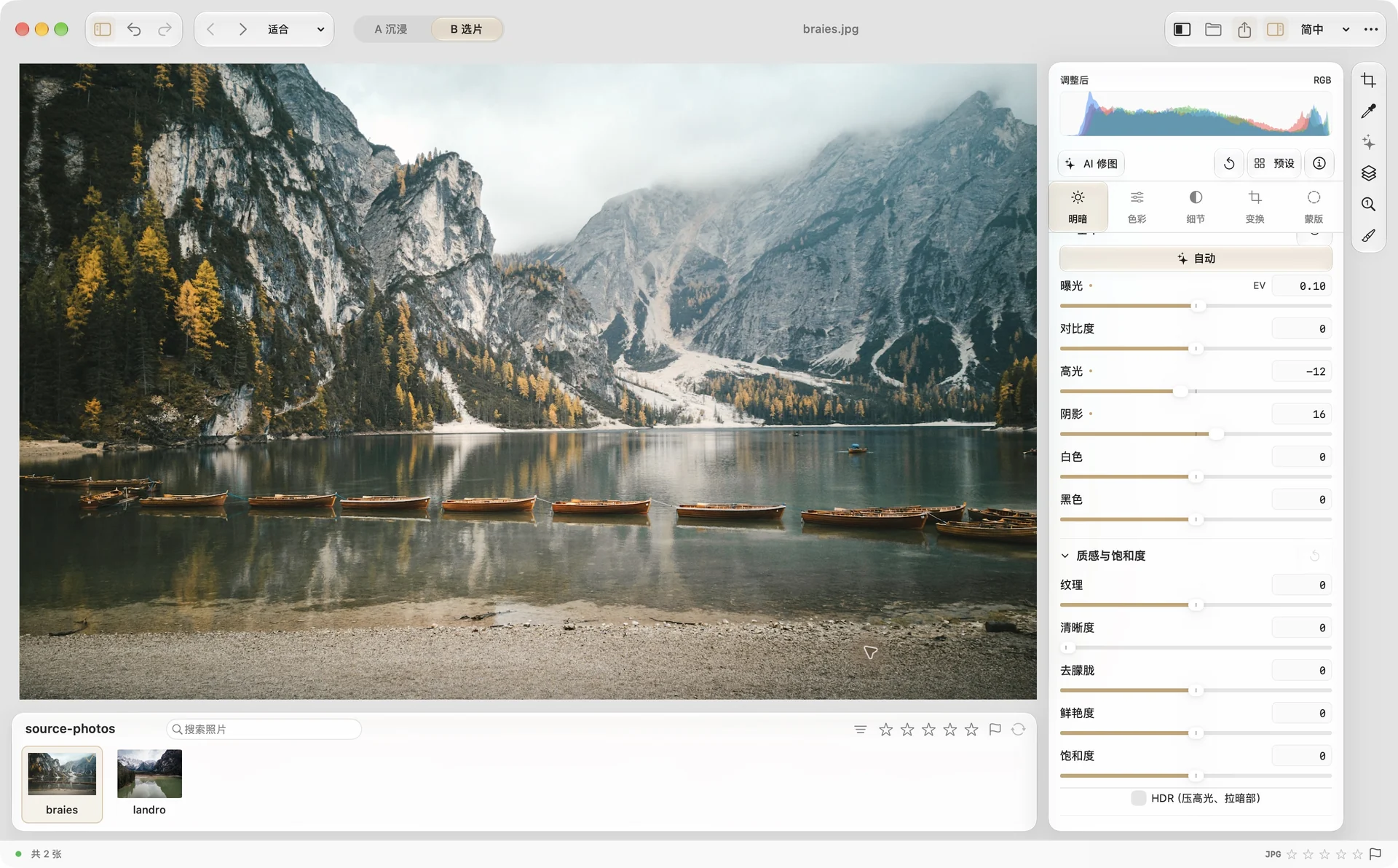
Light, 16-bit Metal & EDR

Shape highlights and shadows in a 16-bit extended linear floating-point Metal pipeline without harsh clipping.

  • 16-bit extended linear GPU pipeline (extendedLinearSRGB / .RGBAh, 20 Metal compute kernels) with an EDR / HDR preview canvas.
  • AgX contrast pivot and highlight rolloff, 14-stop Guided Filter edge-preserving tone, bidirectional whites/blacks and J clipping warnings.
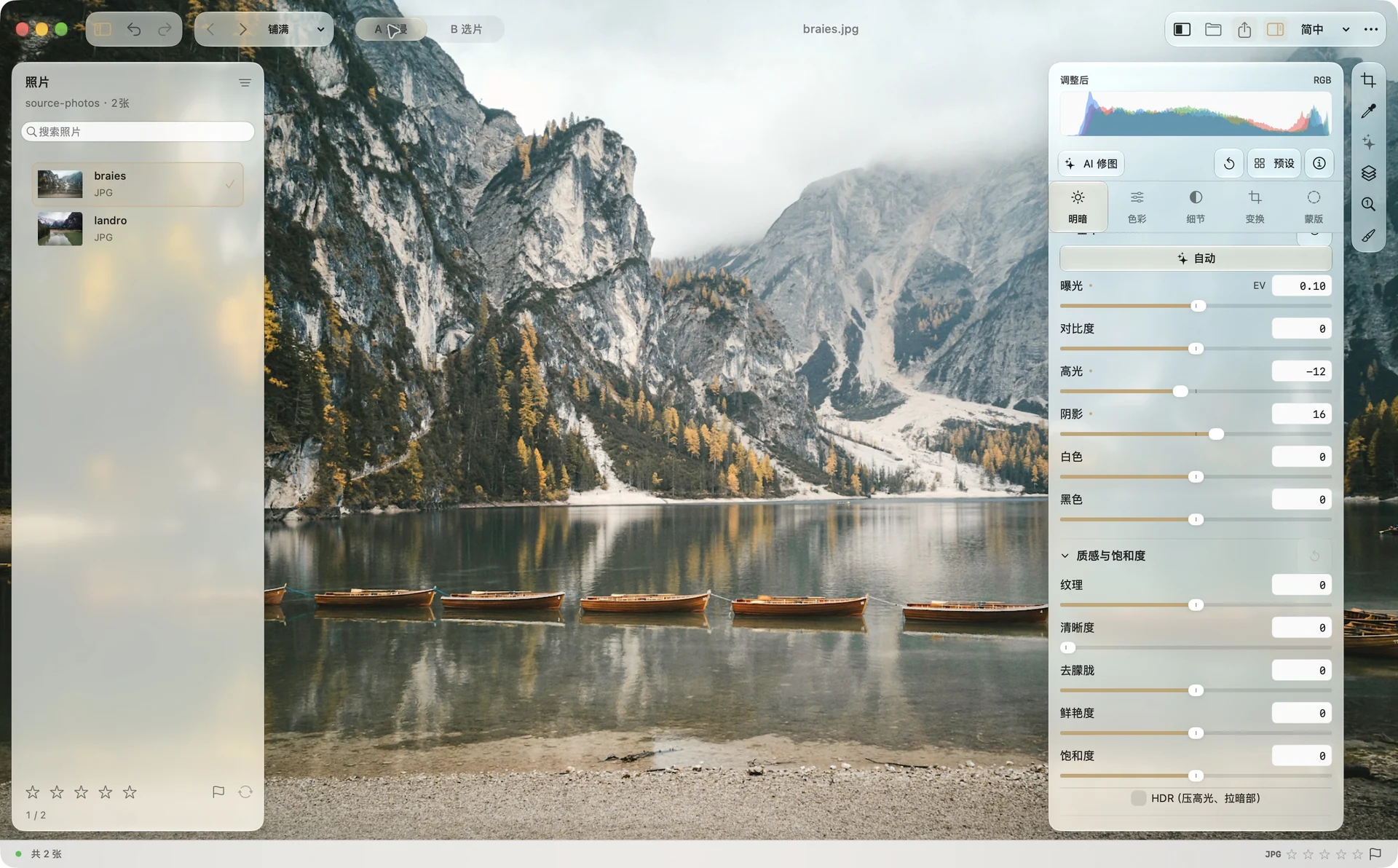
  • Temperature, tint and gray-point eyedropper, texture/clarity/dehaze and scene-aware auto tone as an editable starting point.
Light adjustment workspace
Specifications and details

Full 16-bit half-float extended linear rendering (with automatic CGImage fallback), covering exposure, AgX pivot/rolloff, Guided Filter highlights/shadows/dehaze, bidirectional whites/blacks, white-balance gray-point eyedropper and real-time clipping alerts (J).

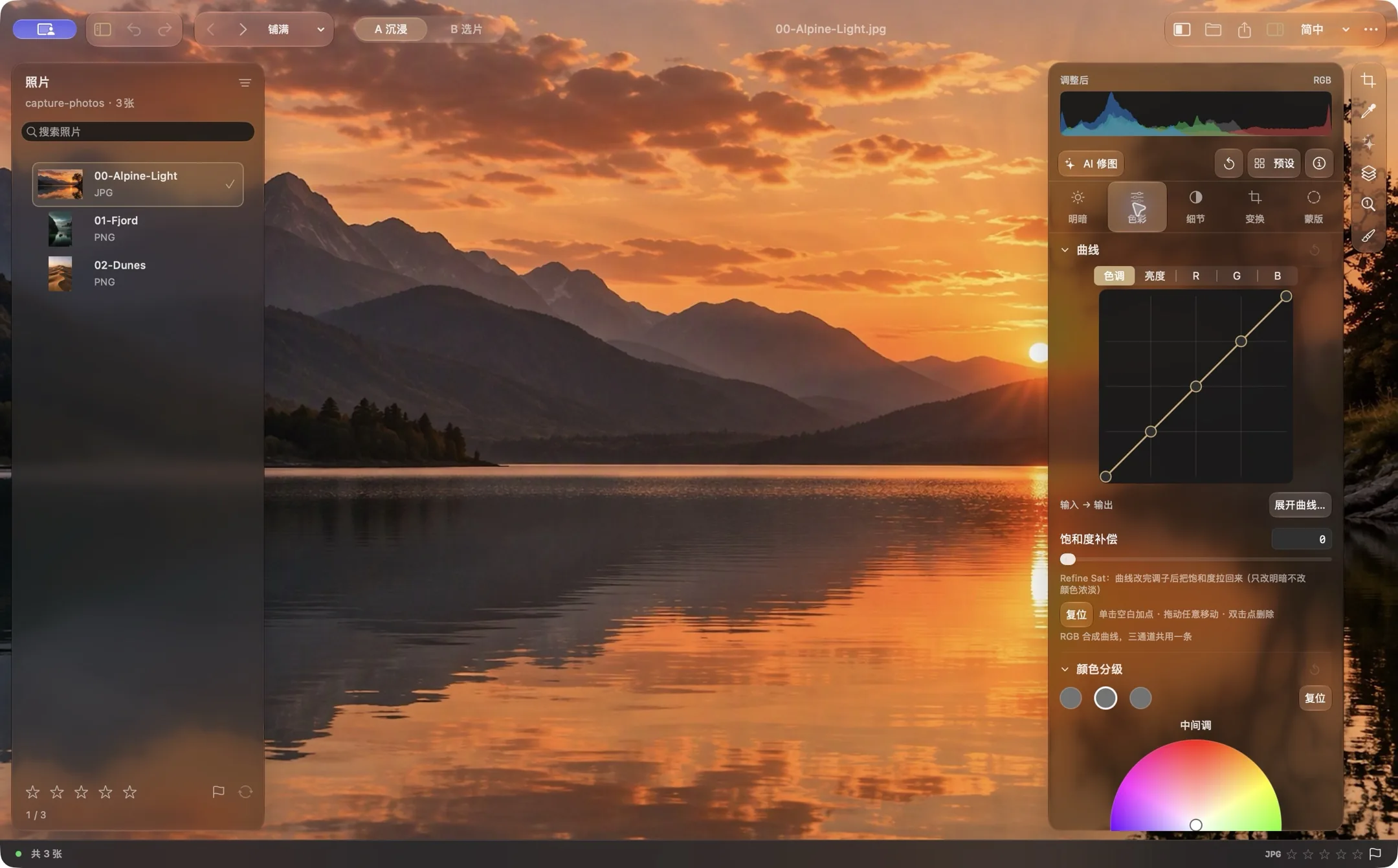
Curves, OKLCH Point Color & Color Match

Build a cohesive look, pinpoint a single hue in OKLCH, or match any reference still into editable sliders.

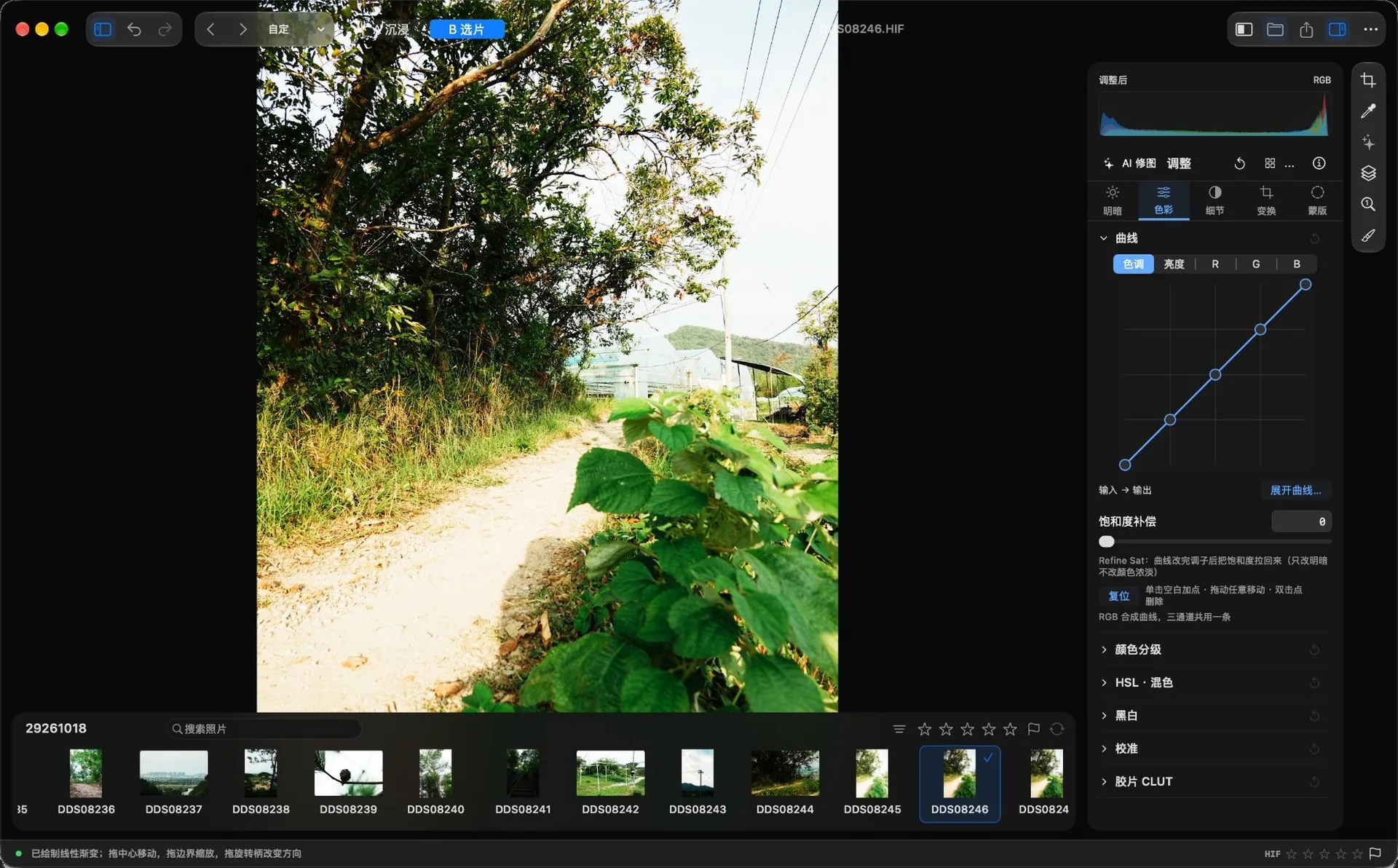
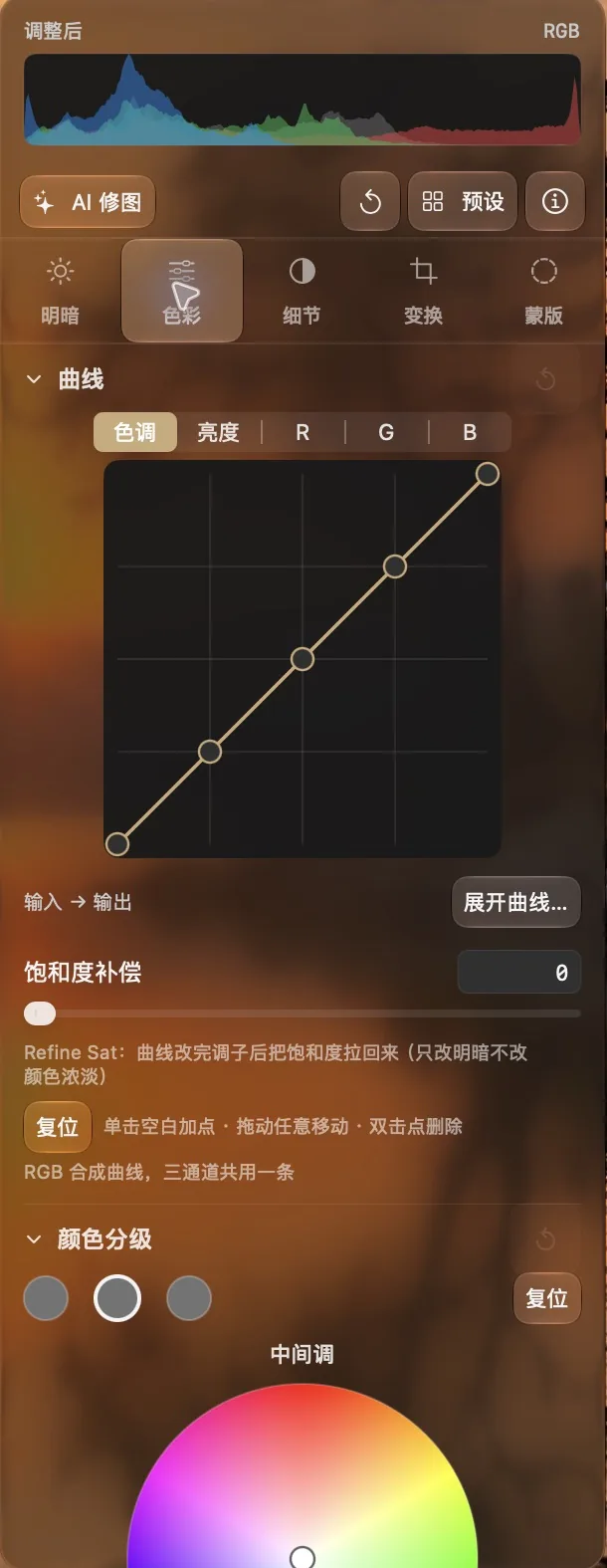
  • Five curve channels (composite, luminance, R, G and B) with an expandable editor, plus shadow, midtone and highlight color grading.
  • Perceptually uniform OKLCH 8-band HSL, dedicated Point Color eyedropper swatches (independent hue/chroma/luminance/range), B&W mixing and calibration.
  • Reference-to-Editable-Parameters Color Match: match any reference still into fully editable Phos parameters via OKLab/OKLCH statistics and coordinate descent, with 0–150% strength and skin protection.
Curves and color grading
Specifications and details
Current Phos color inspector with curves, color grading and HSL controls
Colour inspector detail

Film, AI Denoise / 2x Super Res & Remove

Film texture, seamless object removal and non-destructive RAW denoise/super resolution in one GPU pipeline.

  • 303 HALD film CLUTs (including Kodak 2383 / 2393 print looks), .cube import and background scanning, with grain roughness, vignette and halation.
  • Heal, Clone & Remove: Poisson blending, automatic clean source suggestions and on-canvas dragging; Remove uses built-in 4-level PatchMatch plus optional offline Core ML Big-LaMa (LaMa.mlmodelc).
  • Non-destructive RAW Denoise & Export 2x Super Res: Metal linear YCoCg edge-preserving denoise and export-only Lanczos 2x + structure-tensor sharpening (or optional tiled Core ML neural models), preserving the 1:1 preview contract with zero bloated intermediate DNGs.
Specifications and details

HALD CLUT 64³ cube resampling; Retouch supports H to toggle pins, Delete to remove spots and a dual-ring cursor preview; optional Core ML neural denoise & 2x Super Res use seamless 512×512 Hann-window tiling.

Composite Masks & AI Segmentation

Combine shapes and AI selections with Add, Subtract and Intersect boolean math — each with its own local stack.

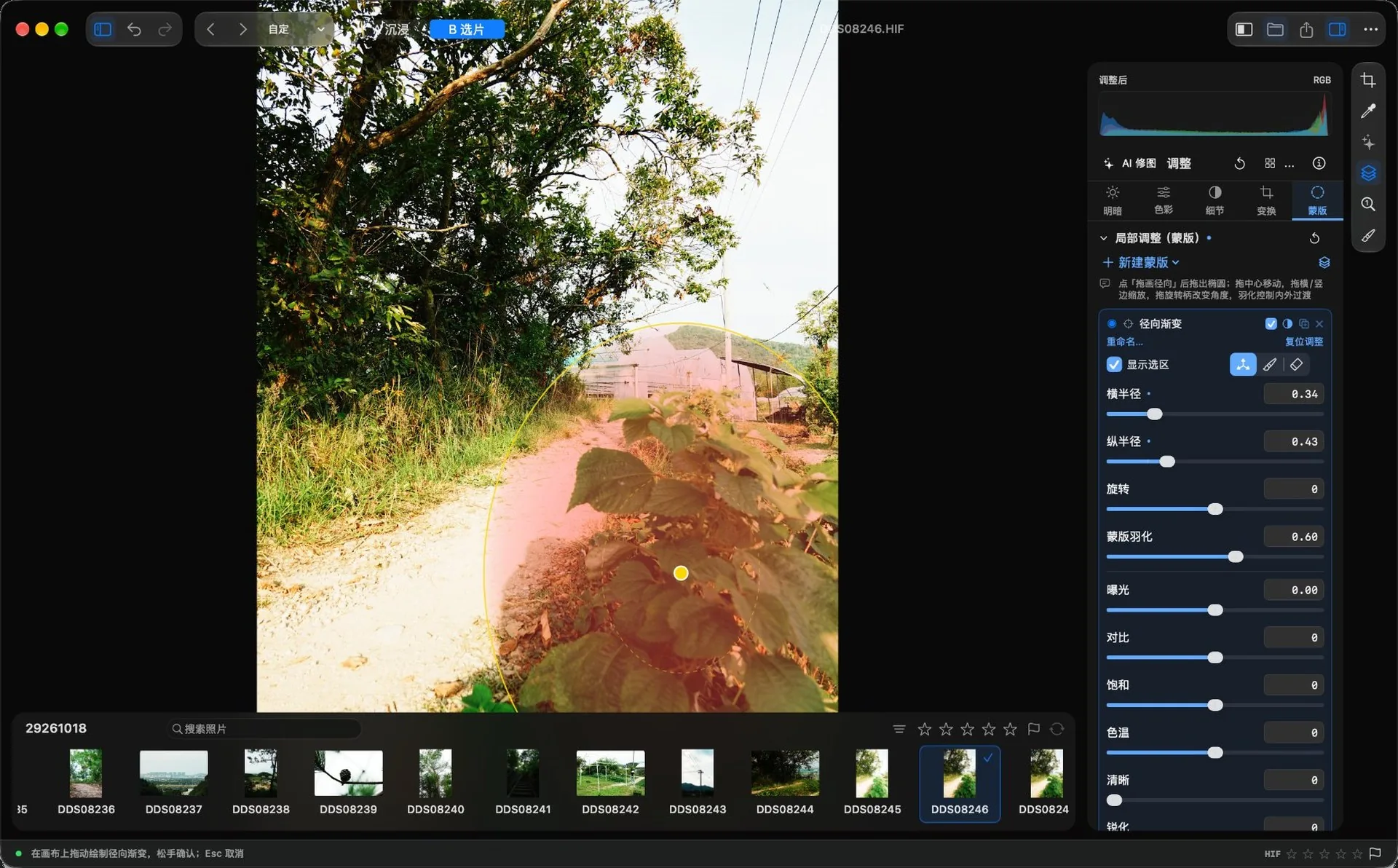
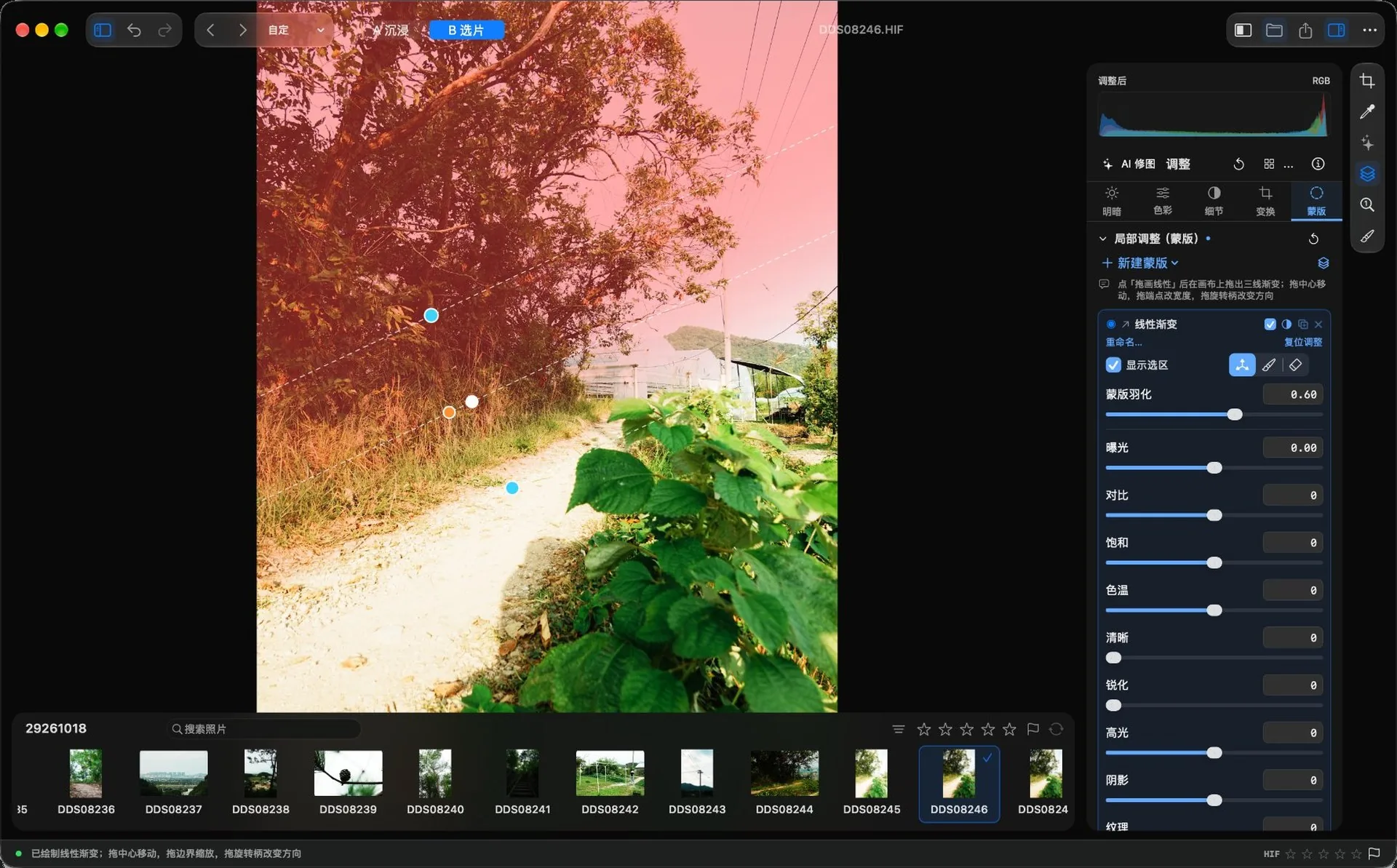
  • Linear and radial gradients, color range, luminance range and a brush with Auto Mask edge snapping and tablet pen pressure.
  • AI Segmentation: Subject, Person, Background, Foreground transparent cutout, upgraded zero-model / Core ML Sky segmentation and 8 portrait body sub-parts (face skin, body skin, eyes, eyebrows, lips, teeth, hair, clothes).
  • Add / Subtract / Intersect boolean sub-masks and full-resolution Guided Filter edge refinement; every mask carries full tone sliders, expandable local curves, local OKLCH Point Color and local LUTs.
Linear gradient mask example
Specifications and details

Every boolean sub-mask can be selected individually, switched between Add/Subtract/Intersect, inverted, toggled and dragged directly on canvas. Sky segmentation uses a zero-model horizon + gradient-blocked BFS engine and supports optional Core ML SkySegmentation weights via the Model Hub.

Crop, 82 Lens Profiles & Depth Optical Bokeh

Correct composition and optics, then sculpt realistic shallow depth of field on any RAW file.

  • Eight crop handles, aspect ratios, 90° rotation, horizontal flip, auto level and automatic/manual perspective correction with full undo.
  • 82 built-in lens profiles plus external Lensfun XML import, distortion/vignette correction, lateral CA & purple-fringe suppression, before/after comparison and an 8-way reference grid.
  • Any-RAW Monocular Depth & Physical Optical Bokeh: generate depth maps without iPhone portrait metadata (built-in Vision saliency + person + perspective zero-model engine, or optional Core ML DepthAnythingV2), with click-on-canvas focus sampling, depth heatmap, circular & 5–8 polygon blades, linear HDR specular boost and cat-eye vignetting.

Multi-View, Smart Culling, Search & XMP

Pick keepers fast from bursts, keep every series consistent and interoperate cleanly with Adobe XMP.

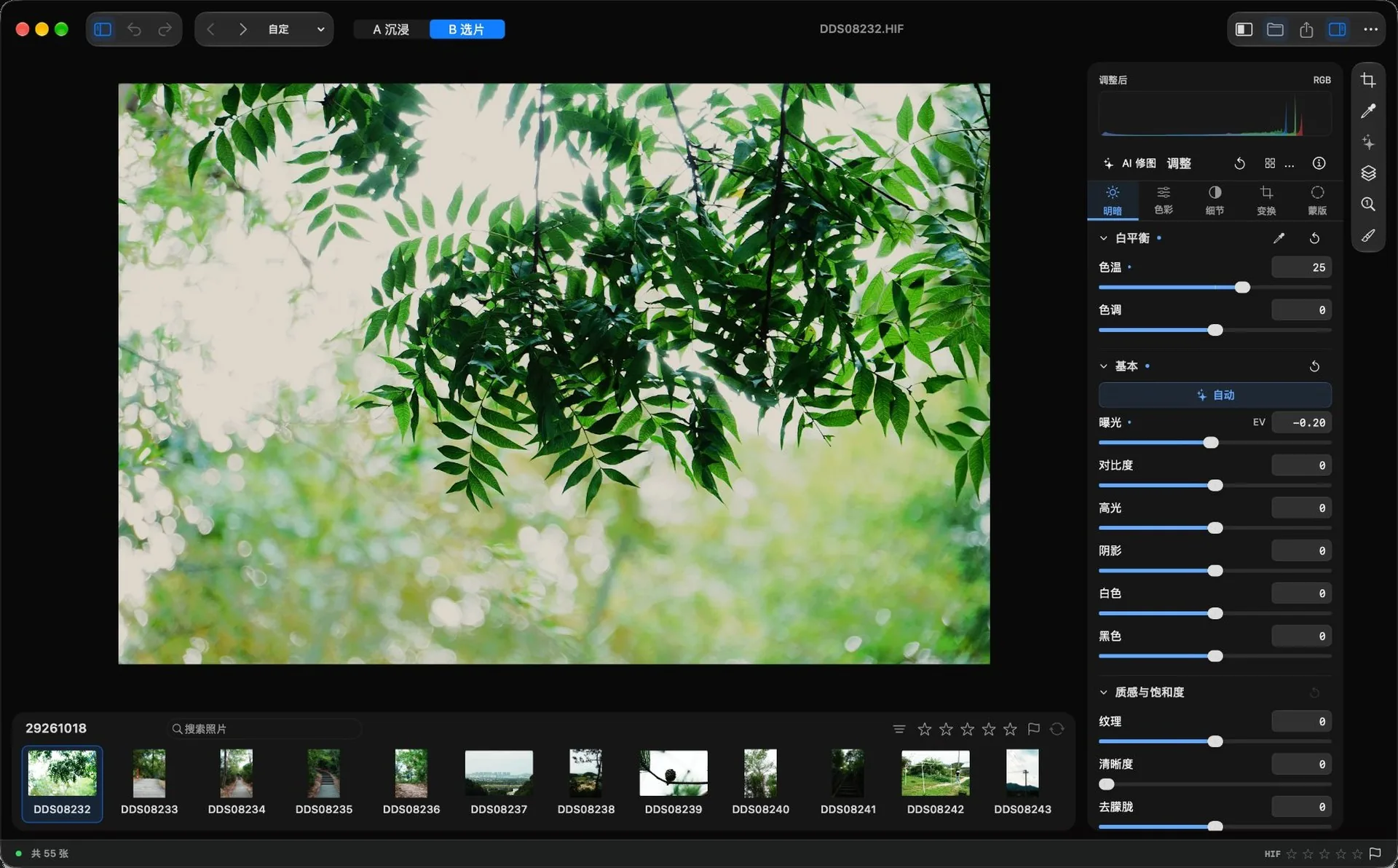
  • A Immersive and B Filmstrip paired with full-canvas Grid (G), Compare (C), 2–4 Up Survey (N) and Reference (⇧R) views, synchronized zoom/pan, Virtual Copies, recursive subfolder scanning and camera/lens/keyword filters.
  • On-Device Smart Culling & Bilingual Semantic Search: automatic EAR eye-closure detection, focus sharpness scoring, burst-best clustering, bilingual natural-language concept search and visual similarity sorting.
  • Bidirectional Adobe XMP & Lightroom Presets: read and write standard XMP sidecars (ratings, picks/rejects, tone, HSL, curves, color grading, crop) with persistent auto-sync; import Lightroom .xmp presets with hover preview and 0–200% strength scaling, plus snapshots, adjustment sync and multi-exposure compositing.
Filmstrip selection workflow
Specifications and details

Multi-select and sync adjustments, restore snapshots, named presets, named snapshots, and multi-exposure compositing.

The main window rebuilt in 4.0: A List for one-at-a-time editing, B Filmstrip for continuous culling. The toolbar shares a centerline with the system traffic lights, the list and inspector widths are draggable, and switching layouts doesn’t interrupt editing.

HDR / Wide-Gamut Export & Watermarks

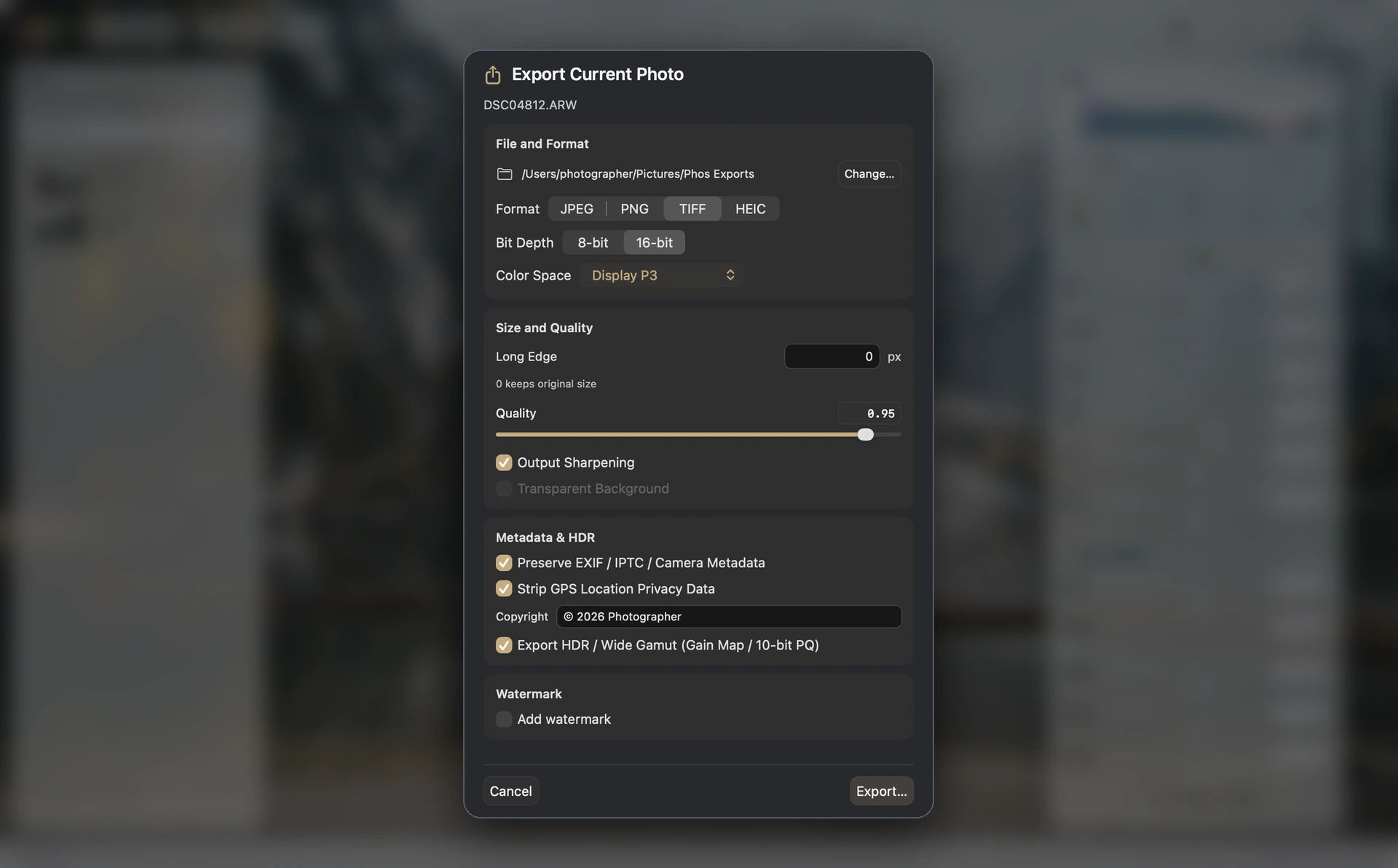
Deliver exact bit depth, HDR dynamic range, metadata privacy and watermarks.

  • Supports Gain-Map HDR JPEG, 10-bit Display P3 PQ HEIC, plus 8/16-bit Display P3, Adobe RGB and sRGB TIFF & PNG.
  • Export-only 2x Super Resolution, long-edge resize, output quality, output sharpening and transparent foreground cutout export.
  • Preserves EXIF / IPTC / camera metadata with one-click GPS privacy removal, copyright attribution, 9-point text/image watermarks and concurrent batch export.
Phos English export sheet showing 16-bit Display P3, HDR Gain Map / 10-bit PQ, EXIF/GPS privacy and watermark settings
Export and watermark settings
Specifications and details

Single and bounded-concurrent batch export with Gain-Map HDR JPEG, 10-bit PQ HEIC, 16-bit wide-gamut TIFF/PNG, export 2x Super Res, EXIF/IPTC/GPS privacy controls, 9-point text/image watermarks and pinned export directory.

Zero-Python Native AI & 5-Slot Model Hub

On-device AI that works out of the box, with optional Core ML acceleration and local VLM support.

  • Pure-Swift Native AI Workbench: built-in NativePhotoPlanner (pixel statistics + intent parsing + local mask generation) and Reference Color Match work with zero Python setup.
  • 5-Slot Core ML Model Hub: manage optional weights for LaMa Remove, Sky Segmentation, DepthAnythingV2, AI RAW Denoise and AI 2x Super Res in one place; every slot falls back automatically to high-quality zero-model algorithms.
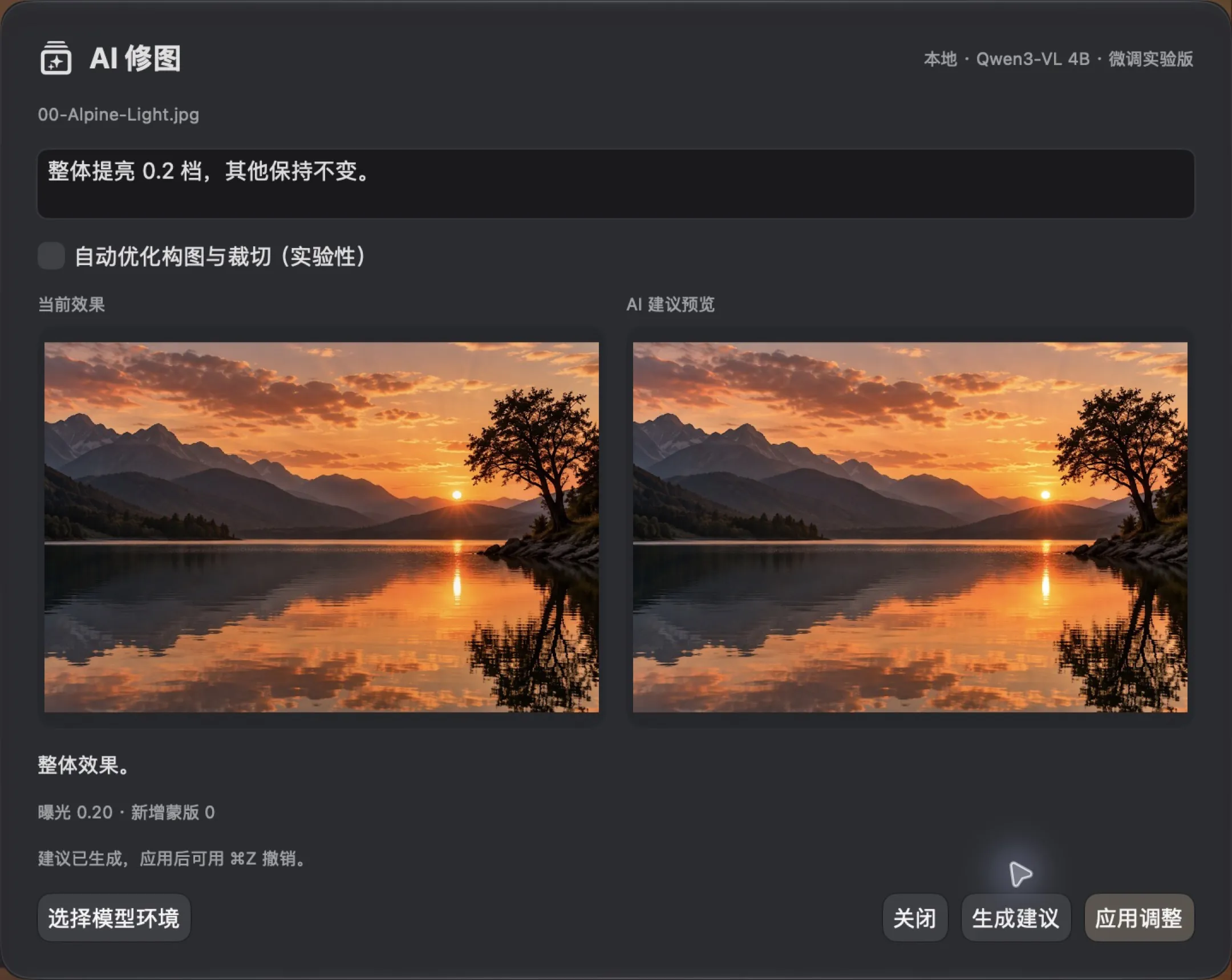
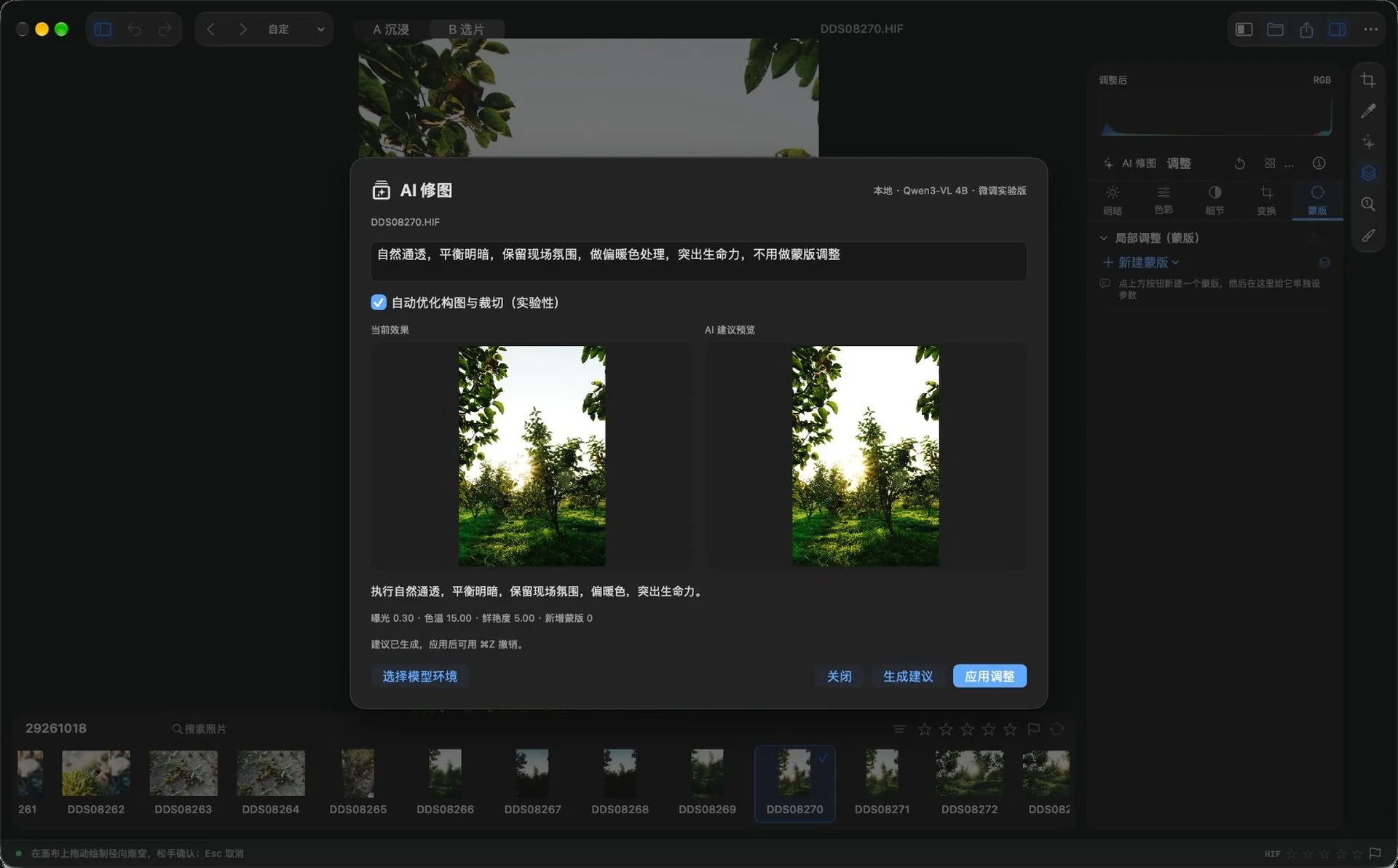
  • Optional Qwen3-VL (MLX) Mode: for open-ended natural-language prompting, optionally install the ~3.1 GB base model alongside the bundled 1.3 MB fine-tuned adapter; every draft previews side by side and stays 100% on your Mac.
Local AI suggestion preview
Specifications and details

Native AI Edit, Reference Color Match, zero-model depth/sky, PatchMatch remove, YCoCg RAW denoise and 2x Super Res are ready on first launch. See the AI & Model Hub guide for Core ML slot setup and the optional Qwen3-VL MLX installer.

Development validation and constraints (not an independent test)

4.1 ships new fine-tuned weights: on the same 301 controlled validation prompts, first-pass strict completion rose from 51.8% to 94.0%. Only the 1.3 MB adapter bundled with the app changed — the base model does not need to be downloaded again. These numbers come from a development validation set, not an independent test, and say nothing about aesthetics.

Say it precisely, it obeys

Requests like “crop 5% off each side, keep the full height” are computed by code, not estimated by the model. Auto-crop first validates dimensions and retained area; an invalid plan is sent back for one retry, and after two failures nothing is applied.

Keep means keep

When you explicitly ask to “leave exposure alone” or “keep white balance unchanged,” those sliders are removed from the model’s writable fields and checked again after decoding. Mixed global and local requests are supported just the same.

Preview first, then decide

Generated plans show a preview and are only written after you confirm; each apply is one undo. Local effects are checked against the direction of real rendered pixels and retried or blocked when they don’t match.

View the original AI workflow example
Phos AI editing panel: after a Chinese prompt, it suggests exposure, temperature, vibrance, and other parameters, with current and suggested results side by side; the top right is labeled “fine-tune experimental”
AI Edit · Fine-tune experimental
Write a request and the model proposes exposure, temperature, vibrance, and local mask suggestions. The current result is on the left, the suggestion on the right; nothing is written until you confirm, and closing it leaves the original untouched — not a single byte.

Native Metal Engine, Bilingual & Files

Built natively for Apple silicon to match how your Mac works.

  • Swift, Metal (20 compute kernels), Core Image, Vision, Core ML and AppKit, with automatic light/dark appearance and adaptive app icon.
  • Follow System, Simplified Chinese and English — 1,017 UI translations switch instantly without restarting.
  • Edits write to .rawforge.json and optional bidirectional Adobe .xmp sidecars, staying backward-compatible with legacy RawForge files while never modifying originals.
Specifications and details

Mainstream RAW formats such as ARW / CR3 / NEF / RAF / DNG, plus HEIF / HEIC / HIF, JPEG, PNG, TIFF, and AVIF.

Choose Follow System, 简体中文, or English — it switches instantly, no restart. 1,017 strings cover menus, parameters, forms, the Model Hub and messages; tooltips and accessibility labels follow the language too.

A non-destructive RAW photo editor built for macOS 26+ on Apple silicon. The 16-bit extended linear Metal pipeline and on-device AI run entirely on your Mac; edits live in sidecar files next to your originals, leaving every original byte untouched.

Graphite and champagne

The interface is built on neutral graphite panels; champagne gold marks only selection and editing states, while everything else stays restrained. The order comes from a strict grid: a fixed line-height rhythm, tabular figures, and hairline dividers.

Restrained gold

Gold doesn’t decorate — it reports state: selection rings, slider fills, film cards, the primary export button. If it’s gold, you’re editing.

Strict grid

A fixed 26 / 27 / 34 px line-height rhythm, 16 px padding throughout, right-aligned tabular figures. Dense, never messy.

Masks you can read

Guides are 1 px white dashed lines, and handle colors encode their job: linear gradient endpoints are cyan, the center is white, the rotation handle is amber; radial gradients are yellow. The color tells you what you can drag.

Drag endpointrange Drag endpointrange Drag center to move Rotation handle · direction
Endpoint: sets the gradient width
Center: moves the whole gradient
Rotation handle: changes direction
Radial: ellipse and feather boundary

Control diagram, not an application screenshot. Scroll horizontally on a narrow screen to inspect the handles.